" height="9.18705px" id="AiyYyR90G" transform="translate(3.406 3.406)" width="9.18685px"/></svg>)
" height="1.90314px" id="wtDTm6bEW" transform="translate(26.225 0)" width="2.4723000000000006px"/><path d="M 0.557 0 L 1.438 0 C 1.746 0 1.995 0.25 1.995 0.559 L 1.995 1.344 C 1.995 1.653 1.746 1.903 1.438 1.903 L 0.557 1.903 C 0.25 1.903 0 1.653 0 1.344 L 0 0.559 C 0 0.25 0.25 0 0.557 0 Z" fill="rgb(29, 28, 27)" height="1.9031500000000001px" id="GnmDnNra_" transform="translate(36.408 2.728)" width="1.9953000000000003px"/><path d="M 6.224 0 L 0.558 0 C 0.25 0 0 0.25 0 0.559 L 0 1.344 C 0 1.653 0.25 1.903 0.558 1.903 L 6.224 1.903 C 6.531 1.903 6.781 1.653 6.781 1.344 L 6.781 0.559 C 6.781 0.25 6.531 0 6.224 0 Z" fill="rgb(29, 28, 27)" height="1.9031500000000001px" id="hKTQ3dbw4" transform="translate(34.261 5.456)" width="6.781100000000002px"/><path d="M 6.955 0 L 0.558 0 C 0.25 0 0 0.25 0 0.559 L 0 1.344 C 0 1.653 0.25 1.903 0.558 1.903 L 6.955 1.903 C 7.263 1.903 7.513 1.653 7.513 1.344 L 7.513 0.559 C 7.513 0.25 7.263 0 6.955 0 Z" fill="rgb(29, 28, 27)" height="1.9031500000000001px" id="G1Zzk9CUU" transform="translate(28.298 8.243)" width="7.513100000000001px"/><path d="M 7.123 0 L 0.558 0 C 0.25 0 0 0.25 0 0.559 L 0 1.344 C 0 1.653 0.25 1.903 0.558 1.903 L 7.123 1.903 C 7.431 1.903 7.681 1.653 7.681 1.344 L 7.681 0.559 C 7.681 0.25 7.431 0 7.123 0 Z" fill="rgb(29, 28, 27)" height="1.9030999999999985px" id="fm7cHxIfJ" transform="translate(0 10.972)" width="7.68067px"/><path d="M 13.447 0 L 0.558 0 C 0.25 0 0 0.25 0 0.559 L 0 1.344 C 0 1.653 0.25 1.903 0.558 1.903 L 13.447 1.903 C 13.755 1.903 14.004 1.653 14.004 1.344 L 14.004 0.559 C 14.004 0.25 13.755 0 13.447 0 Z" fill="rgb(29, 28, 27)" height="1.9030999999999985px" id="LowSwDrtg" transform="translate(9.552 10.972)" width="14.0044px"/><path d="M 0.558 0 L 8.212 0 C 8.52 0 8.77 0.25 8.77 0.559 L 8.77 1.344 C 8.77 1.653 8.52 1.903 8.212 1.903 L 0.558 1.903 C 0.25 1.903 0 1.653 0 1.344 L 0 0.559 C 0 0.25 0.25 0 0.558 0 Z" fill="rgb(29, 28, 27)" height="1.9030999999999985px" id="xRiKc2od7" transform="translate(27.041 10.972)" width="8.769900000000003px"/><path d="M 0.557 0 L 5.4 0 C 5.708 0 5.958 0.25 5.958 0.559 L 5.958 1.344 C 5.958 1.653 5.708 1.903 5.4 1.903 L 0.557 1.903 C 0.25 1.903 0 1.653 0 1.344 L 0 0.559 C 0 0.25 0.25 0 0.557 0 Z" fill="rgb(29, 28, 27)" height="1.9031500000000001px" id="JWdNVicde" transform="translate(36.796 8.243)" width="5.957599999999999px"/><path d="M 1.438 0 L 0.558 0 C 0.25 0 0 0.25 0 0.559 L 0 1.344 C 0 1.653 0.25 1.903 0.558 1.903 L 1.438 1.903 C 1.746 1.903 1.995 1.653 1.995 1.344 L 1.995 0.559 C 1.995 0.25 1.746 0 1.438 0 Z" fill="rgb(29, 28, 27)" height="1.9031500000000001px" id="RfFYVCT_T" transform="translate(28.717 5.456)" width="1.9953000000000003px"/><path d="M 0.558 0 L 2.895 0 C 3.203 0 3.453 0.25 3.453 0.559 L 3.453 1.406 C 3.453 1.714 3.203 1.964 2.895 1.964 L 0.558 1.964 C 0.25 1.964 0 1.714 0 1.406 L 0 0.559 C 0 0.25 0.25 0 0.558 0 Z" fill="rgb(29, 28, 27)" height="1.964299999999998px" id="dngJ6MU2p" transform="translate(16.183 24.582)" width="3.4525000000000006px"/><path d="M 1.706 0 L 0.558 0 C 0.25 0 0 0.25 0 0.559 L 0 1.406 C 0 1.714 0.25 1.964 0.558 1.964 L 1.706 1.964 C 2.014 1.964 2.263 1.714 2.263 1.406 L 2.263 0.559 C 2.263 0.25 2.014 0 1.706 0 Z" fill="rgb(29, 28, 27)" height="1.964299999999998px" id="N_fstvKmR" transform="translate(22.18 24.582)" width="2.2631999999999977px"/><path d="M 0.558 0 L 5.544 0 C 5.852 0 6.101 0.25 6.101 0.559 L 6.101 1.406 C 6.101 1.714 5.852 1.964 5.544 1.964 L 0.558 1.964 C 0.25 1.964 0 1.714 0 1.406 L 0 0.559 C 0 0.25 0.25 0 0.558 0 Z" fill="rgb(29, 28, 27)" height="1.964299999999998px" id="t55XLYcgb" transform="translate(25.486 24.582)" width="6.101399999999998px"/><path d="M 1.976 0 L 0.558 0 C 0.25 0 0 0.25 0 0.559 L 0 1.406 C 0 1.714 0.25 1.964 0.558 1.964 L 1.976 1.964 C 2.284 1.964 2.533 1.714 2.533 1.406 L 2.533 0.559 C 2.533 0.25 2.284 0 1.976 0 Z" fill="rgb(29, 28, 27)" height="1.964299999999998px" id="ZrEKTVTAe" transform="translate(28.542 21.854)" width="2.5334000000000003px"/><path d="M 0.557 0 L 1.438 0 C 1.746 0 1.995 0.25 1.995 0.559 L 1.995 1.406 C 1.995 1.714 1.746 1.964 1.438 1.964 L 0.557 1.964 C 0.25 1.964 0 1.714 0 1.406 L 0 0.559 C 0 0.25 0.25 0 0.557 0 Z" fill="rgb(29, 28, 27)" height="1.964299999999998px" id="Z0fPTp9aR" transform="translate(11.425 24.582)" width="1.9953000000000003px"/><path d="M 0 0.559 C 0 0.251 0.251 0 0.558 0 L 1.438 0 C 1.745 0 1.995 0.251 1.995 0.559 L 1.995 1.405 C 1.995 1.713 1.745 1.964 1.438 1.964 L 0.558 1.964 C 0.251 1.964 0 1.713 0 1.405 Z" fill="rgb(29, 28, 27)" height="1.964299999999998px" id="Tj_PDHFDh" transform="translate(20.635 27.308)" width="1.9954px"/><path d="M 0.557 0 L 1.342 0 C 1.65 0 1.899 0.25 1.899 0.559 L 1.899 1.406 C 1.899 1.714 1.65 1.964 1.342 1.964 L 0.557 1.964 C 0.25 1.964 0 1.714 0 1.406 L 0 0.559 C 0 0.25 0.25 0 0.557 0 Z" fill="rgb(29, 28, 27)" height="1.9643000000000015px" id="AYq9dXkKz" transform="translate(18.686 30.036)" width="1.8994px"/><path d="M 0.558 0 L 5.768 0 C 6.076 0 6.326 0.25 6.326 0.559 L 6.326 1.344 C 6.326 1.653 6.076 1.903 5.768 1.903 L 0.558 1.903 C 0.25 1.903 0 1.653 0 1.344 L 0 0.559 C 0 0.25 0.25 0 0.558 0 Z" fill="rgb(29, 28, 27)" height="1.9031500000000001px" id="rspevfJcx" transform="translate(12.157 8.243)" width="6.325900000000001px"/><path d="M 3.285 0 L 0.558 0 C 0.25 0 0 0.25 0 0.559 L 0 1.344 C 0 1.653 0.25 1.903 0.558 1.903 L 3.285 1.903 C 3.593 1.903 3.842 1.653 3.842 1.344 L 3.842 0.559 C 3.842 0.25 3.593 0 3.285 0 Z" fill="rgb(29, 28, 27)" height="1.9031500000000001px" id="XRUAhGnph" transform="translate(23.887 2.728)" width="3.8424000000000014px"/><path d="M 0.558 0 L 5.644 0 C 5.952 0 6.202 0.25 6.202 0.559 L 6.202 1.344 C 6.202 1.653 5.952 1.903 5.644 1.903 L 0.558 1.903 C 0.25 1.903 0 1.653 0 1.344 L 0 0.559 C 0 0.25 0.25 0 0.558 0 Z" fill="rgb(29, 28, 27)" height="1.9031500000000001px" id="VsaVVIfke" transform="translate(21.528 5.456)" width="6.201600000000003px"/><path d="M 3.06 0 L 0.558 0 C 0.25 0 0 0.25 0 0.559 L 0 1.344 C 0 1.653 0.25 1.903 0.558 1.903 L 3.06 1.903 C 3.369 1.903 3.618 1.653 3.618 1.344 L 3.618 0.559 C 3.618 0.25 3.369 0 3.06 0 Z" fill="rgb(29, 28, 27)" height="1.9030999999999985px" id="wiAKEgyId" transform="translate(40.819 10.972)" width="3.6182000000000016px"/><path d="M 0.558 0 L 17.318 0 C 17.626 0 17.875 0.25 17.875 0.559 L 17.875 1.345 C 17.875 1.653 17.626 1.903 17.318 1.903 L 0.558 1.903 C 0.25 1.903 0 1.653 0 1.345 L 0 0.559 C 0 0.25 0.25 0 0.558 0 Z" fill="rgb(29, 28, 27)" height="1.9032px" id="FIE0ufK9m" transform="translate(6.666 13.7)" width="17.87506px"/><path d="M 6.426 0 L 0.558 0 C 0.25 0 0 0.25 0 0.559 L 0 1.345 C 0 1.653 0.25 1.903 0.558 1.903 L 6.426 1.903 C 6.734 1.903 6.984 1.653 6.984 1.345 L 6.984 0.559 C 6.984 0.25 6.734 0 6.426 0 Z" fill="rgb(29, 28, 27)" height="1.9032000000000018px" id="ut9UWny3L" transform="translate(22.892 19.156)" width="6.983599999999999px"/><path d="M 0.558 0 L 22.151 0 C 22.459 0 22.709 0.25 22.709 0.559 L 22.709 1.344 C 22.709 1.653 22.459 1.903 22.151 1.903 L 0.558 1.903 C 0.25 1.903 0 1.653 0 1.344 L 0 0.559 C 0 0.25 0.25 0 0.558 0 Z" fill="rgb(29, 28, 27)" height="1.9030999999999985px" id="VULnffgbk" transform="translate(9.552 16.428)" width="22.7089px"/><path d="M 7.886 0 L 0.558 0 C 0.25 0 0 0.25 0 0.559 L 0 1.345 C 0 1.653 0.25 1.903 0.558 1.903 L 7.886 1.903 C 8.194 1.903 8.443 1.653 8.443 1.345 L 8.443 0.559 C 8.443 0.25 8.194 0 7.886 0 Z" fill="rgb(29, 28, 27)" height="1.9032000000000018px" id="adZTYr4MR" transform="translate(6.078 19.156)" width="8.44303px"/><path d="M 0.558 0 L 2.211 0 C 2.519 0 2.769 0.25 2.769 0.559 L 2.769 1.406 C 2.769 1.714 2.519 1.964 2.211 1.964 L 0.558 1.964 C 0.25 1.964 0 1.714 0 1.406 L 0 0.559 C 0 0.25 0.25 0 0.558 0 Z" fill="rgb(29, 28, 27)" height="1.964299999999998px" id="bwdUdEmCH" transform="translate(13.784 21.854)" width="2.768600000000001px"/><path d="M 2.424 0 L 0.558 0 C 0.25 0 0 0.25 0 0.559 L 0 1.406 C 0 1.714 0.25 1.964 0.558 1.964 L 2.424 1.964 C 2.732 1.964 2.982 1.714 2.982 1.406 L 2.982 0.559 C 2.982 0.25 2.732 0 2.424 0 Z" fill="rgb(29, 28, 27)" height="1.964299999999998px" id="PUvesMJEj" transform="translate(23.556 21.854)" width="2.982199999999999px"/><path d="M 0.558 0 L 2.241 0 C 2.55 0 2.799 0.25 2.799 0.559 L 2.799 1.406 C 2.799 1.714 2.55 1.964 2.241 1.964 L 0.558 1.964 C 0.25 1.964 0 1.714 0 1.406 L 0 0.559 C 0 0.25 0.25 0 0.558 0 Z" fill="rgb(29, 28, 27)" height="1.964299999999998px" id="Wo2W7J3Zj" transform="translate(8.672 21.854)" width="2.799050000000001px"/><path d="M 6.661 0 L 0.558 0 C 0.25 0 0 0.25 0 0.559 L 0 1.345 C 0 1.653 0.25 1.903 0.558 1.903 L 6.661 1.903 C 6.969 1.903 7.219 1.653 7.219 1.345 L 7.219 0.559 C 7.219 0.25 6.969 0 6.661 0 Z" fill="rgb(29, 28, 27)" height="1.9032px" id="PpPVZXp9j" transform="translate(27.041 13.7)" width="7.218900000000001px"/><path d="M 0.621 1.905 C 0.218 1.905 0 1.687 0 1.283 L 0 0.622 C 0 0.218 0.218 0 0.621 0 L 11.225 0 C 11.628 0 11.846 0.218 11.846 0.622 L 11.846 1.283 C 11.846 1.687 11.628 1.905 11.225 1.905 L 6.934 1.905 L 6.934 14.926 C 6.934 15.33 6.716 15.548 6.313 15.548 L 5.537 15.548 C 5.134 15.548 4.916 15.33 4.916 14.926 L 4.916 1.905 Z" fill="rgb(29, 28, 27)" height="15.54825px" id="xr32fxeO6" transform="translate(52.177 8.243)" width="11.845599999999997px"/><path d="M 0.621 0 C 0.218 0 0 0.218 0 0.622 L 0 14.924 C 0 15.328 0.218 15.546 0.621 15.546 L 1.357 15.546 C 1.76 15.546 1.978 15.328 1.978 14.924 L 1.978 0.622 C 1.978 0.218 1.76 0 1.357 0 Z" fill="rgb(29, 28, 27)" height="15.546050000000001px" id="oSsO_UPVN" transform="translate(90.476 8.243)" width="1.9779000000000053px"/><path d="M 0.62 15.546 C 0.217 15.546 0 15.328 0 14.924 L 0 0.622 C 0 0.218 0.217 0 0.62 0 L 1.396 0 C 1.799 0 2.017 0.218 2.017 0.622 L 2.017 13.632 L 8.981 13.632 C 9.384 13.632 9.602 13.85 9.602 14.254 L 9.602 14.924 C 9.602 15.328 9.384 15.546 8.981 15.546 Z" fill="rgb(29, 28, 27)" height="15.546050000000001px" id="Sgj4z5osO" transform="translate(116.749 8.243)" width="9.602000000000004px"/><path d="M 1.974 14.924 C 1.974 15.328 1.756 15.546 1.353 15.546 L 0.621 15.546 C 0.218 15.546 0 15.328 0 14.924 L 0 0.622 C 0 0.218 0.218 0 0.621 0 L 1.357 0 C 1.76 0 1.978 0.218 1.978 0.622 L 1.978 5.747 C 2.634 4.721 3.806 4.079 5.309 4.079 C 8.18 4.079 10.356 6.358 10.356 9.948 C 10.356 13.538 8.18 15.817 5.309 15.817 C 3.801 15.817 2.627 15.175 1.971 14.145 L 1.971 14.922 Z M 8.36 9.95 C 8.36 7.362 6.881 5.928 5.121 5.928 C 3.361 5.928 1.863 7.362 1.863 9.95 C 1.863 12.539 3.361 13.972 5.121 13.972 C 6.881 13.972 8.36 12.539 8.36 9.95 Z" fill="rgb(29, 28, 27)" height="15.81665px" id="q13jjj7xd" transform="translate(138.401 8.243)" width="10.355999999999995px"/><path d="M 4.457 11.738 C 0.961 11.738 -0.019 9.872 0 8.318 C 0.005 7.929 0.253 7.735 0.645 7.735 L 1.344 7.735 C 1.748 7.735 1.922 7.949 1.961 8.352 C 2.063 9.315 2.693 9.907 4.433 9.907 C 6.174 9.907 7.012 9.269 7.012 8.289 C 7.012 7.425 6.522 7.108 5.305 6.899 L 3.209 6.539 C 1.453 6.238 0.29 5.247 0.29 3.468 C 0.29 1.467 1.774 0 4.518 0 C 7.263 0 8.838 1.491 8.814 3.23 C 8.81 3.614 8.553 3.808 8.165 3.808 L 7.457 3.808 C 7.054 3.808 6.908 3.595 6.851 3.202 C 6.749 2.477 6.159 1.818 4.518 1.818 C 2.878 1.818 2.249 2.508 2.249 3.403 C 2.249 4.175 2.695 4.516 3.81 4.714 L 5.906 5.083 C 7.72 5.404 8.98 6.292 8.98 8.198 C 8.98 9.976 7.908 11.74 4.455 11.74 Z" fill="rgb(29, 28, 27)" height="11.739799999999999px" id="tJ8syeWTW" transform="translate(150.024 12.325)" width="8.980269730401375px"/><path d="M 9.146 7.997 C 9.146 8.813 9.175 9.983 9.282 10.799 C 9.334 11.223 9.155 11.465 8.728 11.465 L 8.068 11.465 C 7.685 11.465 7.467 11.319 7.428 11.022 L 7.317 10.181 C 6.724 11.157 5.565 11.659 4.145 11.659 C 1.579 11.659 0 10.142 0 8.078 C 0 6.27 1.27 5.157 3.433 5.002 L 6.589 4.78 C 7.162 4.741 7.186 4.688 7.186 4.153 L 7.186 3.682 C 7.186 2.438 6.434 1.807 4.79 1.807 C 3.145 1.807 2.472 2.425 2.405 3.289 C 2.376 3.697 2.235 3.916 1.823 3.916 L 1.067 3.916 C 0.675 3.916 0.427 3.717 0.422 3.328 C 0.407 1.51 1.74 0 4.792 0 C 7.798 0 9.162 1.427 9.155 3.736 Z M 7.188 7.298 L 7.188 6.244 C 6.955 6.327 6.678 6.386 6.363 6.415 L 3.598 6.676 C 2.59 6.775 1.997 7.163 1.997 8.099 L 1.999 8.099 C 1.999 9.188 2.886 9.97 4.4 9.97 C 6.169 9.97 7.188 8.9 7.188 7.298 Z" fill="rgb(29, 28, 27)" height="11.658999999999999px" id="QPESIZvku" transform="translate(126.854 12.325)" width="9.290755130109668px"/><path d="M 5.224 0 C 8.313 0 10.295 2.255 10.295 5.456 L 10.295 5.694 C 10.295 6.098 10.077 6.316 9.674 6.316 L 1.998 6.316 C 2.168 8.547 3.447 9.898 5.407 9.898 C 6.768 9.898 7.598 9.363 7.934 8.431 C 8.06 8.078 8.243 7.892 8.618 7.892 L 9.33 7.892 C 9.746 7.892 9.994 8.125 9.923 8.538 C 9.598 10.433 7.834 11.74 5.409 11.74 L 5.407 11.738 C 2.168 11.738 0 9.424 0 5.797 C 0 2.169 2.135 0 5.224 0 Z M 5.222 1.74 C 3.494 1.74 2.405 2.818 2.074 4.64 L 8.282 4.64 C 8.054 2.842 6.949 1.74 5.222 1.74 Z" fill="rgb(29, 28, 27)" height="11.739799999999999px" id="PKmyQkwJE" transform="translate(104.541 12.325)" width="10.295000000000002px"/><path d="M 4.459 11.194 C 4.099 11.194 3.877 11.039 3.746 10.703 L 0.091 1.021 C -0.024 0.72 -0.031 0.511 0.076 0.297 C 0.178 0.094 0.381 0 0.732 0 L 1.274 0 C 1.633 0 1.86 0.155 1.986 0.495 L 4.958 8.503 L 5.123 9.018 L 5.289 8.503 L 8.262 0.495 C 8.388 0.155 8.615 0 8.974 0 L 9.517 0 C 9.865 0 10.07 0.092 10.172 0.297 C 10.279 0.511 10.275 0.72 10.157 1.021 L 6.502 10.703 C 6.371 11.039 6.149 11.194 5.79 11.194 Z" fill="rgb(29, 28, 27)" height="11.1941px" id="uUQr5Yl4B" transform="translate(93.807 12.595)" width="10.248961642504256px"/><path d="M 5.407 11.738 C 2.167 11.738 0 9.424 0 5.797 C 0 2.169 2.133 0 5.221 0 C 8.31 0 10.292 2.255 10.292 5.456 L 10.292 5.694 C 10.292 6.098 10.075 6.316 9.672 6.316 L 1.995 6.316 C 2.165 8.547 3.446 9.898 5.404 9.898 C 6.768 9.898 7.596 9.363 7.931 8.431 C 8.058 8.078 8.241 7.892 8.615 7.892 L 9.328 7.892 C 9.744 7.892 9.992 8.125 9.918 8.538 C 9.593 10.433 7.829 11.74 5.404 11.74 Z M 8.282 4.64 C 8.053 2.842 6.949 1.74 5.221 1.74 C 3.494 1.74 2.405 2.818 2.074 4.64 Z" fill="rgb(29, 28, 27)" height="11.739799999999999px" id="zo1nSBuSF" transform="translate(78.397 12.325)" width="10.29249999999999px"/><path d="M 3.057 10.677 C 3.163 11.026 3.392 11.192 3.756 11.192 L 3.749 11.194 L 4.987 11.194 C 5.35 11.194 5.579 11.028 5.69 10.679 L 8.173 2.654 L 8.237 2.401 L 8.3 2.654 L 10.787 10.679 C 10.894 11.028 11.123 11.194 11.487 11.194 L 12.733 11.194 C 13.096 11.194 13.325 11.028 13.432 10.679 L 16.418 1.006 C 16.516 0.7 16.512 0.498 16.41 0.288 C 16.307 0.089 16.109 0.002 15.76 0.002 L 15.218 0.002 C 14.848 0.002 14.626 0.168 14.519 0.522 L 12.094 8.547 L 12.046 8.761 L 11.999 8.542 L 9.506 0.517 C 9.4 0.168 9.171 0.002 8.807 0.002 L 7.683 0.002 C 7.319 0.002 7.091 0.168 6.984 0.517 L 4.492 8.542 L 4.449 8.745 L 4.405 8.551 L 1.98 0.519 C 1.874 0.166 1.649 0 1.281 0 L 0.728 0 C 0.38 0 0.181 0.087 0.079 0.286 C -0.021 0.493 -0.028 0.698 0.07 1.004 Z" fill="rgb(29, 28, 27)" height="11.194099999999999px" id="uboloLX99" transform="translate(61.282 12.598)" width="16.489163442184434px"/></svg>)
Tutorials
From Opaque Video to Monetizable Moments: Building a Contextual Ad Engine with TwelveLabs
Nathan Che
Most CTV and FAST platforms make ad decisions without analyzing what's actually happening on screen. This tutorial walks through building a contextual ad engine that uses TwelveLabs Pegasus 1.5 for structured scene intelligence, Marengo 3.0 for semantic embeddings, and Databricks Delta Lake for enterprise analytics. The result: ad placement driven by real video understanding with full IAB 3.1 taxonomy compliance and FreeWheel-compatible payloads.
Most CTV and FAST platforms make ad decisions without analyzing what's actually happening on screen. This tutorial walks through building a contextual ad engine that uses TwelveLabs Pegasus 1.5 for structured scene intelligence, Marengo 3.0 for semantic embeddings, and Databricks Delta Lake for enterprise analytics. The result: ad placement driven by real video understanding with full IAB 3.1 taxonomy compliance and FreeWheel-compatible payloads.
In this article
No headings found on page
Join our newsletter
Join our newsletter
Receive the latest advancements, tutorials, and industry insights in video understanding
Receive the latest advancements, tutorials, and industry insights in video understanding
Search, analyze, and explore your videos with AI.
May 19, 2026
14 Minutes
Copy link to article
TLDR
Most CTV/FAST platforms still make ad decisions without looking at what's actually happening on screen. This tutorial walks through building a production-grade contextual ad engine that uses TwelveLabs Pegasus 1.5 for structured scene intelligence, Marengo 3.0 for multimodal embeddings, and Databricks Delta Lake for enterprise analytics. The result: ad placement driven by real video understanding rather than stale metadata, with full IAB 3.1 taxonomy compliance and FreeWheel-compatible payloads.
What you'll build: A complete pipeline that transforms video content into queryable context, matches ads to scenes based on semantic similarity and brand safety rules, identifies optimal break points, and exports decisioning data to Databricks for downstream analytics.
Introduction
Most ad decision stacks treat video as an opaque blob. They rely on metadata, content labels, or historical audience segments to make placement decisions. Everything except the video itself.
This approach works for broad targeting. Keyword matching can get you in the right ballpark. But it leaves significant revenue on the table because it fails to account for three things:
Timing: Ads placed without awareness of scene transitions interrupt the viewing experience and drive abandonment.
Context: Brand safety violations happen when systems can't see what's actually happening on screen. An alcohol ad shouldn't run during a scene depicting addiction recovery.
Depth: Surface-level demographic targeting misses the nuance of household income, viewing device, and real-time engagement signals.
This tutorial addresses all three by building a contextual ad engine that treats video as queryable, structured data rather than a black box. The engine combines:
TwelveLabs Pegasus 1.5 for fine-grained scene understanding: sentiment, tone, cast, environment, and GARM-aligned safety signals
TwelveLabs Marengo 3.0 for multimodal semantic embeddings that enable scene-to-ad similarity scoring
Databricks Delta Lake + Mosaic AI Vector Search for enterprise-grade storage and retrieval
FreeWheel/OpenRTB-compatible payload generation for direct integration with existing ad servers
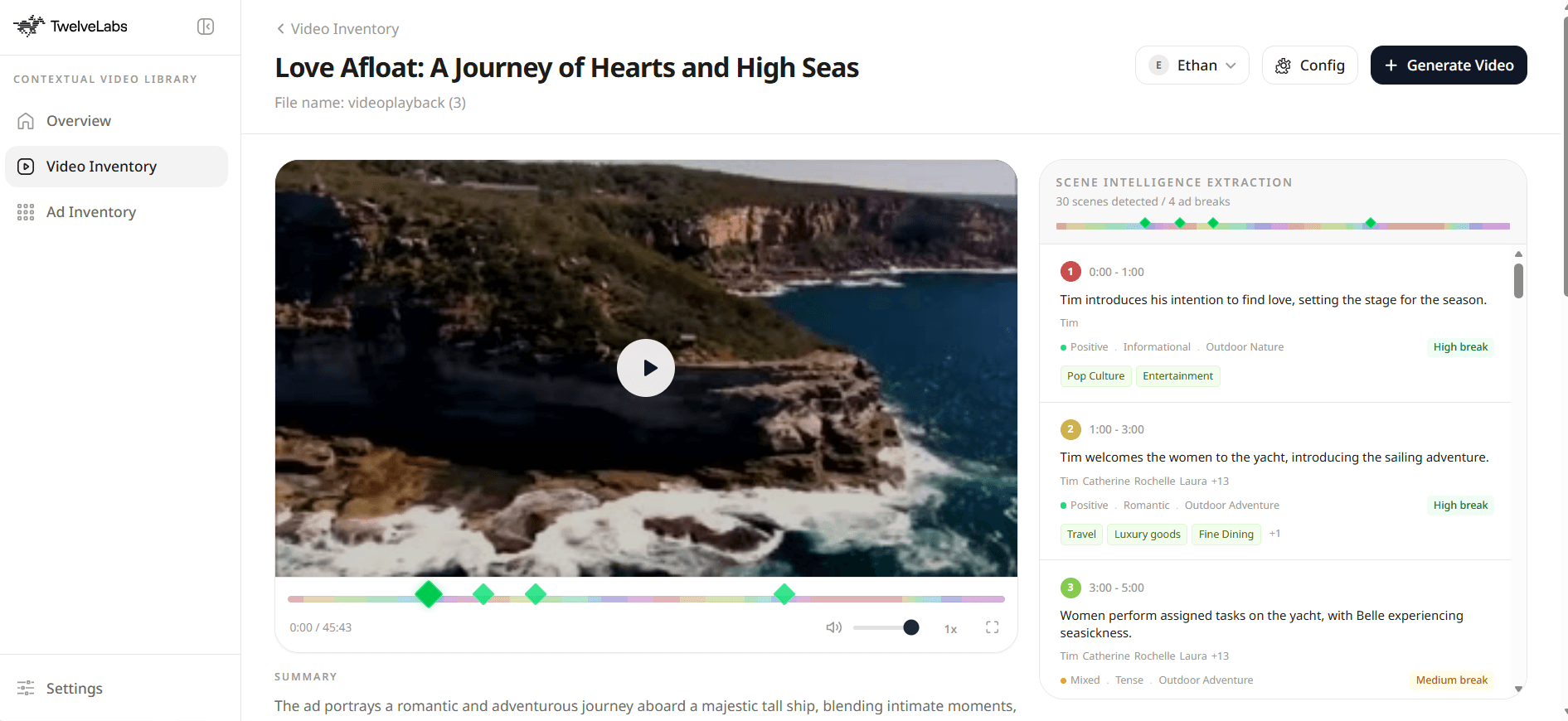
Figure 1: Intelligence Scene Extraction in Video Inventory
The goal: answer the question "Which ad should run at this break, for this audience, in this specific scene, while respecting brand safety and campaign constraints?" with data grounded in actual video content.
Here's a walkthrough of the finished application:
Prerequisites
Before starting, you'll need:
Node.js 18+ and npm/yarn/pnpm
TwelveLabs API Key with two indexes:
TL_INDEX_IDfor content videosTL_AD_INDEX_IDfor ad creatives
Vercel Blob Token (
BLOB_READ_WRITE_TOKEN) for handling large video file transfers to TwelveLabsOpenAI API Key (optional) for low-latency text embedding during IAB 3.1 taxonomy mapping
Databricks Workspace (optional) with
DATABRICKS_TOKEN,DATABRICKS_HOST,DATABRICKS_HTTP_PATH, and optionallyDATABRICKS_CATALOGandDATABRICKS_SCHEMA
Clone and run:
>> git clone https://github.com/nathanchess/twelvelabs-context-ad-engine.git
>> cd contextual-ad-engine
>> npm install
>> cp .env.example .env.local
>> npm
Architecture Overview
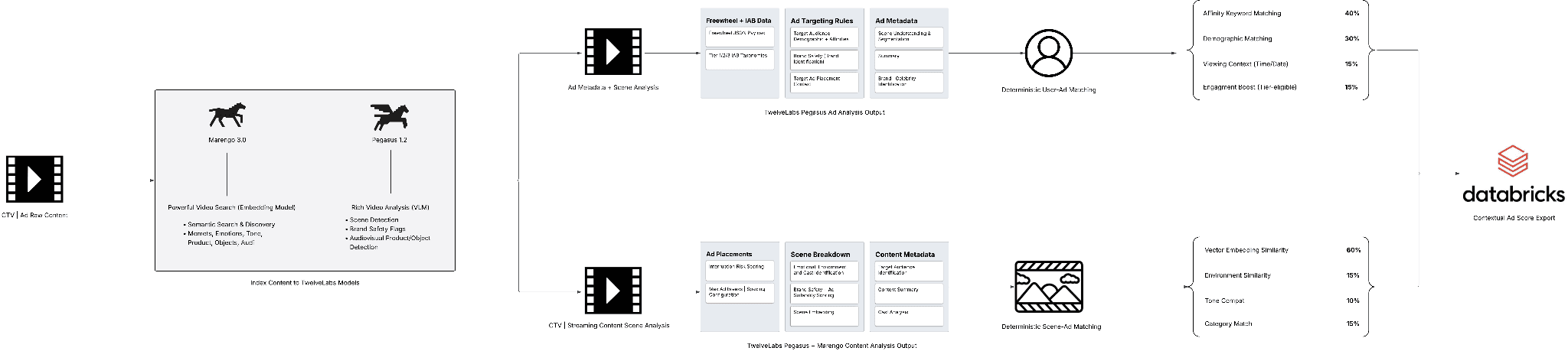
Figure 2: Contextual Ad Engine Backend Architecture (LucidChart)
The architecture leverages two TwelveLabs models that serve complementary roles:
Marengo 3.0 is the encoder. It transforms video into searchable 512-dimensional vector embeddings, making products, emotions, environments, and moments queryable. This enables semantic matching between ad creatives and content scenes.
Pegasus 1.5 is the reasoning model. It generates structured metadata about each scene: demographics, brand safety flags, sentiment, and targeting recommendations. It supports structured outputs, producing consistent JSON that downstream systems can parse deterministically.
By leveraging their unique capabilities and metadata generated into a single deterministic calculation, shown on the right hand side of the technical architecture diagram, of (User-Ad Match Score) x (Scene-Ad Match Score) we are able to recommend ads not based off of pre-written text metadata, but making scene-level decisions grounded in real video understanding.
This allows the ad engine to treat each segment as a living context signal, considering:
Tone
Sentiment
Environment
Brand Safety
This approach makes ad decisions based on what's actually happening in the video, not on content metadata that was labeled weeks ago. For deeper background on the underlying technology, see the TwelveLabs Platform Overview and TwelveLabs Research.
Core Ad Decision | Placement Logic
The core decision logic combines both signals into a single score:
totalScore = adAffinity * sceneFit
Where adAffinity measures how well an ad fits the viewer profile (demographics, interests, policy constraints) and sceneFit measures how well the ad creative fits the current scene (semantic similarity + safety + tone + environment).
The scoring pipeline combines four weighted signals into the sceneFit calculation:
sceneFit =
  suitableMatch  * 0.15 +   // Pegasus suitable_categories overlap
  environmentFit * 0.15 +   // environment-category affinity
  toneCompat     * 0.10 +   // emotional tone compatibility
  contextMatch   * 0.60     // Marengo semantic cosine similarity
The weighting is intentional. In CTV/OTT monetization, the largest CPM lift typically comes from semantic context quality, so Marengo 3.0 drives most of the score. The remaining signals preserve rule-based controllability for policy and content safety teams who need deterministic guardrails.
Step 1: Generate Structured Ad Metadata (Pegasus + IAB + FreeWheel)
This step extracts structured scene intelligence from video content using Pegasus 1.5, normalizes it to IAB 3.1 taxonomy, and generates FreeWheel-compatible key-value pairs for ad server integration.
1.1 - Run Pegasus 1.5 with Structured Output
The /api/analyze endpoint handles three tasks:
Accepts a prompt from the frontend (from the
/videosor/adspage)Checks Vercel Blob cache to avoid redundant processing
Calls Pegasus 1.5 with structured output and stores the result
const tl_client = new TwelveLabs({ apiKey: process.env.TL_API_KEY });
const result = await tl_client.analyze({
  videoId,
  prompt,
  temperature: 0.2,
  response_format
}, { timeoutInSeconds: 90 });
The output is time-aligned metadata that downstream systems can reason over: scene boundaries, sentiment, environment, cast, and safety flags. This replaces brittle keyword-based targeting with grounded video understanding.
1.2 - Normalize Model Output to IAB 3.1 via Embedding KNN ID Matching
The analysis output from Pegasus needs to map to the IAB Content Taxonomy 3.1 for ad server compatibility. The pipeline uses text embeddings and k-nearest-neighbor matching against canonical IAB IDs.
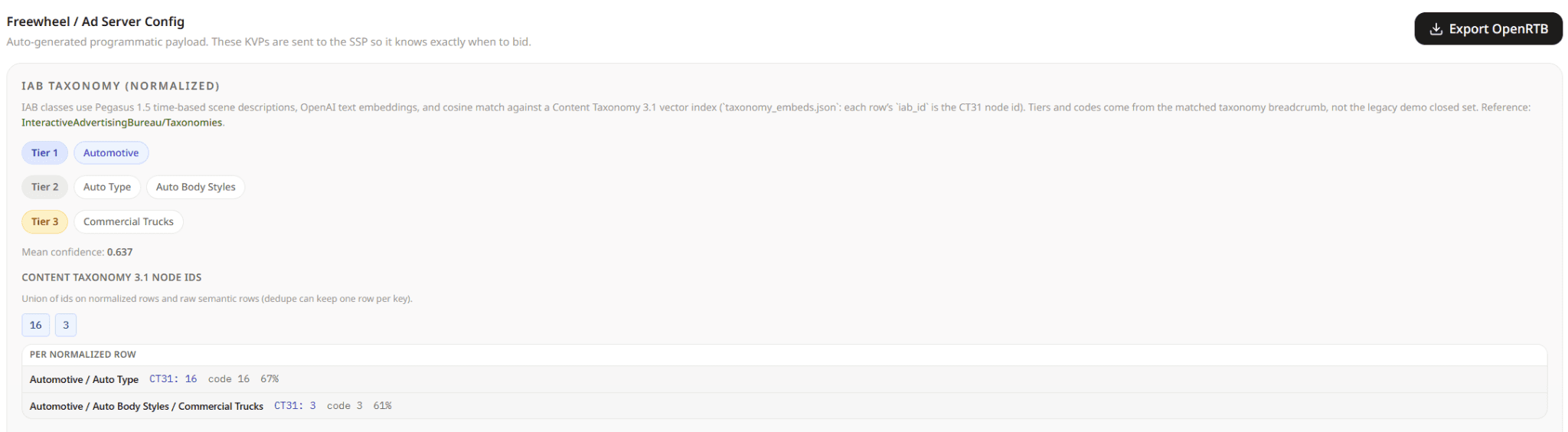
The approach maintains a closed reference table of approved IAB 3.1 rows:
export const IAB_ALLOWED_ROWS = [
  { tier1: "Alcohol", tier2: "Spirits", code: "1005" },
  { tier1: "Alcohol", tier2: "Beer", code: "1003" },
  { tier1: "Consumer Packaged Goods", tier2: "General Food", tier3: "Snacks", code: "1169" },
  { tier1: "Finance and Insurance", tier2: "Stocks and Investments", code: "1338" },
  { tier1: "Vehicles", tier2: "Automotive Ownership", tier3: "New Vehicle Ownership", code: "1536" },
  // ...
] as const;
Each row is embedded once at index time. At runtime, candidate labels from the model are embedded and matched via KNN to the nearest canonical IAB rows, then thresholded and deduplicated:
export function normalizeIabWithKnnPolicy(
  rawInput: unknown,
  categoryKey?: string
): IabPolicyResult {
  const rawItems = Array.isArray(rawInput) ? rawInput : [];
  // 1) Embed candidate text from model output
  const embeddedCandidates = embedCandidateLabels(rawItems);
  // 2) KNN against canonical IAB 3.1 embedding index
  const knnMatches = queryIabKnnIndex(embeddedCandidates, { k: 5 });
  // 3) Keep only policy-compliant matches above similarity threshold
  const normalizedItems = dedupeAndSort(
    applyIabMatchPolicy(knnMatches).filter(
      (item): item is IabTaxonomyItem => Boolean(item)
    )
  );
  const high = normalizedItems.filter((item) => item.confidence >= IAB_HIGH_CONFIDENCE);
  const medium = normalizedItems.filter((item) => item.confidence >= IAB_MEDIUM_CONFIDENCE);
  let effectiveItems: IabTaxonomyItem[] = [];
  let fallbackApplied = false;
  let fallbackReason: string | null = null;
  if (high.length > 0) {
    effectiveItems = high;
  } else if (medium.length > 0) {
    effectiveItems = medium;
    fallbackReason = "No high-confidence Tier-2/3 matches; using medium-confidence Tier-1 band.";
  } else {
    const fallback = (categoryKey && FALLBACK_BY_CATEGORY_KEY[categoryKey]) || [];
    effectiveItems = fallback;
    fallbackApplied = true;
    fallbackReason = fallback.length
      ? "No medium-confidence KNN matches; applied deterministic vertical fallback."
      : "No medium-confidence KNN matches and no category fallback mapping found.";
  }
  const effectiveTier1 = [...new Set(effectiveItems.map((item) => item.tier1))];
  const effectiveTier2 = high.length > 0
    ? [...new Set(effectiveItems.map((item) => item.tier2))]
    : [];
  const effectiveTier3 = high.length > 0
    ? [...new Set(effectiveItems.map((item) => item.tier3).filter((tier3): tier3 is string => Boolean(tier3)))]
    : [];
  const effectiveIabIds = high.length > 0
    ? [...new Set(effectiveItems.map((item) => item.iabId).filter(Boolean))]
    : [];
  const averageConfidence = normalizedItems.length > 0
    ? normalizedItems.reduce((sum, item) => sum + item.confidence, 0) / normalizedItems.length
    : 0;
  return {
    normalizedItems,
    effectiveTier1,
    effectiveTier2,
    effectiveTier3,
    effectiveIabIds,
    averageConfidence,
    fallbackApplied,
    fallbackReason,
  };
}
This pipeline:
Embeds model-generated category phrases
Runs KNN similarity search against canonical IAB 3.1 row embeddings
Snaps candidates to valid IAB taxonomy rows/IDs only
Deduplicates and ranks matches by confidence
Promotes high-confidence rows as effective targeting fields
Applies deterministic vertical fallback when confidence is too low
This is critical for production ad tech: it prevents taxonomy hallucination, enforces valid IAB 3.1 IDs, and still captures semantic nuance through embedding-based matching.
1.3 - Build FreeWheel KVP Payload from Normalized Metadata
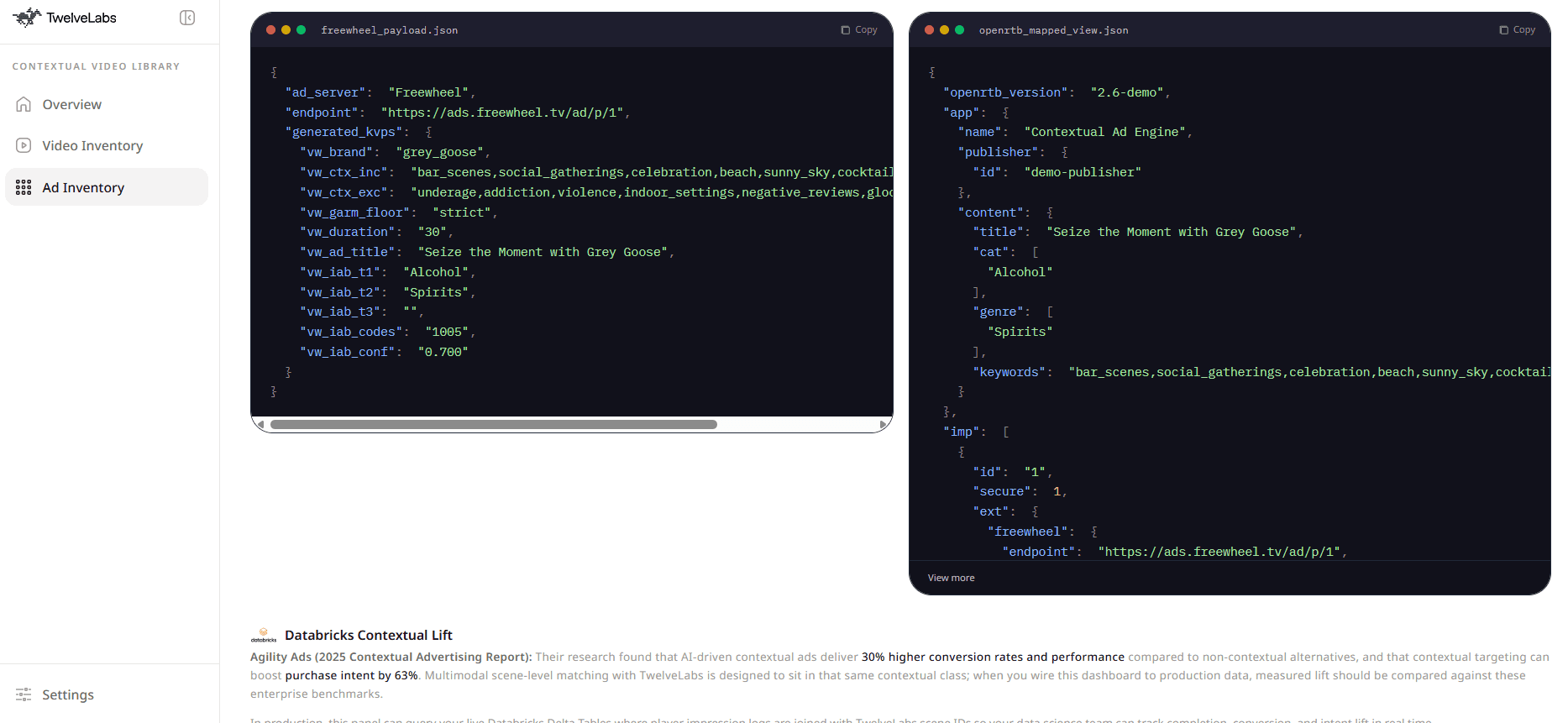
Once IAB and context signals are normalized, the engine generates FreeWheel key-value pairs for downstream ad serving:
const freewheelPayload = {
  ad_server: "Freewheel",
  endpoint: "https://ads.freewheel.tv/ad/p/1",
  generated_kvps: {
    vw_brand: toBrand(parsed.company),
    vw_ctx_inc: includeContexts.join(","),
    vw_ctx_exc: excludeContexts.join(","),
    vw_garm_floor: "strict",
    vw_duration: String(duration),
    vw_ad_title: parsed.proposedTitle || "untitled",
    vw_iab_t1: policy.effectiveTier1.join(","),
    vw_iab_t2: policy.effectiveTier2.join(","),
    vw_iab_t3: policy.effectiveTier3.join(","),
    vw_iab_codes: policy.effectiveCodes.join(","),
    vw_iab_conf: policy.averageConfidence.toFixed(3),
  },
};
The key fields:
vw_ctx_inccombines target contexts and Pegasus-recommended contextsvw_ctx_exccombines campaign exclusions, Pegasus negatives, and GARM flagsvw_iab_*fields are populated only from normalized/effective classes
This step is what connects AI-generated understanding to existing ad ops workflows. TwelveLabs provides semantic intelligence. Policy normalization ensures deterministic, auditable taxonomy behavior. FreeWheel/OpenRTB mapping makes the outputs deployable in production ad servers.
Step 2: Build Multimodal Embeddings with Marengo
Both content scenes and ad creatives are vectorized into the same 512-dimensional embedding space using Marengo 3.0. This enables true semantic matching between scenes and ads, not just keyword overlap.
export function cosineSimilarity(vecA: number[], vecB: number[]): number {
  let dot = 0, normA = 0, normB = 0;
  const len = Math.min(vecA.length, vecB.length);
  for (let i = 0; i < len; i++) {
    dot += vecA[i] * vecB[i];
    normA += vecA[i] * vecA[i];
    normB += vecB[i] * vecB[i];
  }
  if (normA === 0 || normB === 0) return 0;
  return dot / (Math.sqrt(normA) * Math.sqrt(normB));
}
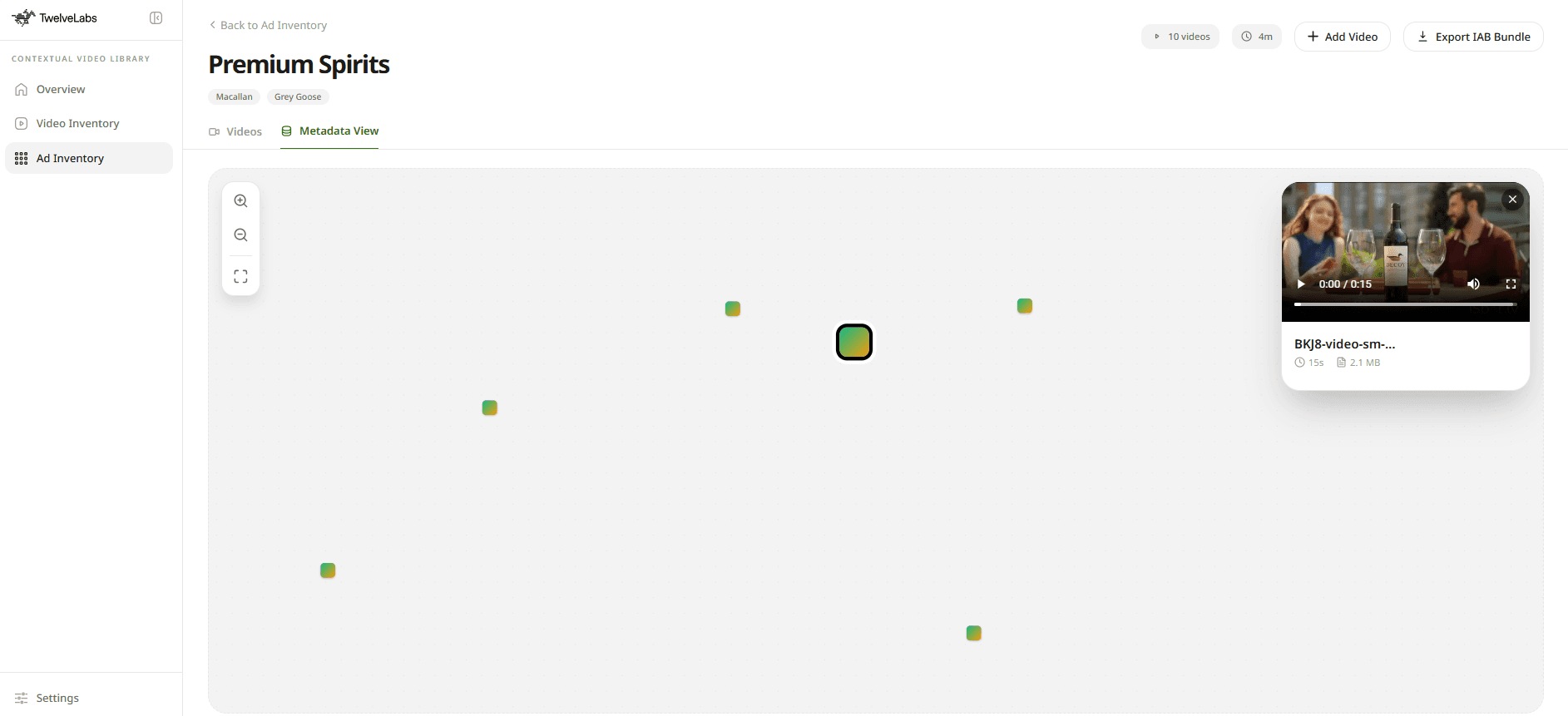
A visualization of these embeddings is available in the deployed application under the Metadata View, showing how semantically similar scenes cluster together.
To improve ranking spread, the engine normalizes expected cosine values and applies a non-linear boost (power transform). This separates high-quality matches more clearly in candidate rankings, making the difference between a 0.7 and 0.8 similarity score more meaningful for ad selection.
Step 3: Identify Optimal Ad Breaks
Before recommending ads, the engine identifies optimal monetization points within the content. Pegasus 1.5 analyzes each scene for:
Post-segment break quality
Interruption risk
Emotional valley detection
Transition type bonus
Mode-aware safety multiplier (strict, balanced, revenue_max)

The engine then applies spacing constraints and selects top breaks greedily with chronological ordering.
This matters in production because ad relevance is only useful if insertion timing is viewer-safe and UX-aware. A perfectly matched ad placed mid-sentence or during an emotional climax will still drive abandonment.
Step 4: Rank Ads with Safety Gates + Diversity Constraints
With optimal break points identified, embeddings computed, and metadata extracted, the engine can rank ads. But raw scoring isn't enough. Production ad decisioning requires two additional layers:
1. Hard Gates for Brand Safety
Before scoring, ads are filtered through:
User/category eligibility checks
Negative campaign context overlap detection
GARM-sensitive exclusions (alcohol, gambling, violence)
Safety mode gate policies
2. Cross-Break Diversity
No viewer, even one who loves cars, wants to see a car ad at every break. The engine enforces:
Same-ad repetition caps across breaks
Category frequency limits
Fallback logic when diversity constraints suppress top candidates
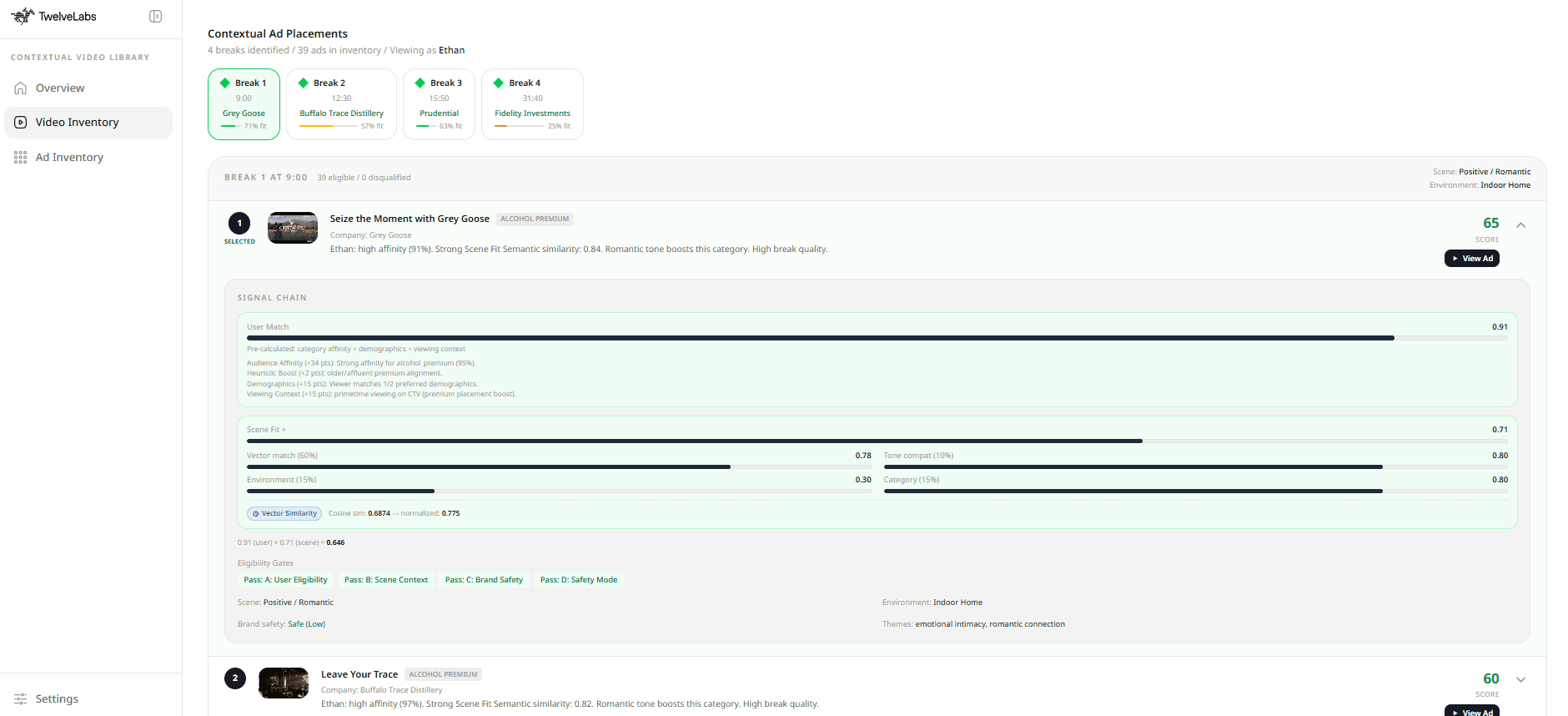
The result is an ad plan that is both high-scoring and broadcast-realistic, tailored to each viewer, scene, and available inventory.
Step 5: Export to Databricks for Enterprise Retrieval and Analytics
The metadata, embeddings, and ad decisioning data generated by this engine are only valuable if they flow into enterprise workflows. The engine exports all signals to Databricks Delta tables for downstream analytics and ML pipelines.
Queries are generated on-demand to match each user's Databricks workspace:
CREATE OR REPLACE VIEW ad_metadata_premium_spirits_vec AS
SELECT
  creative_id,
  campaign_name,
  from_json(marengo_embedding_json, 'array<double>') AS embedding
FROM main.default.ad_metadata_premium_spirits
WHERE vector_sync_status = 'embedded_marengo_clip_avg'
This data lift into Databricks enables:
Mosaic AI Vector Search Indexing for semantic retrieval at scale
Campaign QA with full audit trails on every decision
Similarity Retrieval for creative ops and competitive analysis
Model-assisted planning in BI and ML pipelines
For teams evaluating enterprise rollout, this is where the TwelveLabs + Databricks combination becomes compelling: model-native video intelligence meets production data governance and retrieval infrastructure.
Why TwelveLabs for Contextual Advertising
You've now built (or walked through) a contextual ad engine that makes placement decisions based on actual video content rather than stale metadata. Few systems outside of purpose-built video AI can support this depth of decisioning across timing, sentiment, semantics, and policy in a production-ready architecture.
TwelveLabs provides the foundation:
Pegasus 1.5 for fine-grained, structured scene intelligence
Marengo 3.0 for multimodal semantic retrieval and matching
An API-first architecture that integrates cleanly into existing ad tech stacks
The combination transforms video from an opaque storage cost into a queryable, monetizable asset.
Start Building
Playground: Home | TwelveLabs
API Reference: Introduction | TwelveLabs
Product Overview: Video AI Platform: Search, Analyze & Embed - TwelveLabs
Sales | Enterprise: Contact TwelveLabs: Talk to Sales
Architecture Diagram: https://lucid.app/lucidchart/ef8d11e1-3f00-4bf0-b411-ab8e3bb3606b/edit?viewport_loc=515%2C-1146%2C5419%2C2654%2C0_0&invitationId=inv_09de1972-142b-4369-9df4-f91eb3f5a949
Deployed Application: Contextual Ad Engine — TwelveLabs
TLDR
Most CTV/FAST platforms still make ad decisions without looking at what's actually happening on screen. This tutorial walks through building a production-grade contextual ad engine that uses TwelveLabs Pegasus 1.5 for structured scene intelligence, Marengo 3.0 for multimodal embeddings, and Databricks Delta Lake for enterprise analytics. The result: ad placement driven by real video understanding rather than stale metadata, with full IAB 3.1 taxonomy compliance and FreeWheel-compatible payloads.
What you'll build: A complete pipeline that transforms video content into queryable context, matches ads to scenes based on semantic similarity and brand safety rules, identifies optimal break points, and exports decisioning data to Databricks for downstream analytics.
Introduction
Most ad decision stacks treat video as an opaque blob. They rely on metadata, content labels, or historical audience segments to make placement decisions. Everything except the video itself.
This approach works for broad targeting. Keyword matching can get you in the right ballpark. But it leaves significant revenue on the table because it fails to account for three things:
Timing: Ads placed without awareness of scene transitions interrupt the viewing experience and drive abandonment.
Context: Brand safety violations happen when systems can't see what's actually happening on screen. An alcohol ad shouldn't run during a scene depicting addiction recovery.
Depth: Surface-level demographic targeting misses the nuance of household income, viewing device, and real-time engagement signals.
This tutorial addresses all three by building a contextual ad engine that treats video as queryable, structured data rather than a black box. The engine combines:
TwelveLabs Pegasus 1.5 for fine-grained scene understanding: sentiment, tone, cast, environment, and GARM-aligned safety signals
TwelveLabs Marengo 3.0 for multimodal semantic embeddings that enable scene-to-ad similarity scoring
Databricks Delta Lake + Mosaic AI Vector Search for enterprise-grade storage and retrieval
FreeWheel/OpenRTB-compatible payload generation for direct integration with existing ad servers
Figure 1: Intelligence Scene Extraction in Video Inventory
The goal: answer the question "Which ad should run at this break, for this audience, in this specific scene, while respecting brand safety and campaign constraints?" with data grounded in actual video content.
Here's a walkthrough of the finished application:
Prerequisites
Before starting, you'll need:
Node.js 18+ and npm/yarn/pnpm
TwelveLabs API Key with two indexes:
TL_INDEX_IDfor content videosTL_AD_INDEX_IDfor ad creatives
Vercel Blob Token (
BLOB_READ_WRITE_TOKEN) for handling large video file transfers to TwelveLabsOpenAI API Key (optional) for low-latency text embedding during IAB 3.1 taxonomy mapping
Databricks Workspace (optional) with
DATABRICKS_TOKEN,DATABRICKS_HOST,DATABRICKS_HTTP_PATH, and optionallyDATABRICKS_CATALOGandDATABRICKS_SCHEMA
Clone and run:
>> git clone https://github.com/nathanchess/twelvelabs-context-ad-engine.git
>> cd contextual-ad-engine
>> npm install
>> cp .env.example .env.local
>> npm
Architecture Overview
Figure 2: Contextual Ad Engine Backend Architecture (LucidChart)
The architecture leverages two TwelveLabs models that serve complementary roles:
Marengo 3.0 is the encoder. It transforms video into searchable 512-dimensional vector embeddings, making products, emotions, environments, and moments queryable. This enables semantic matching between ad creatives and content scenes.
Pegasus 1.5 is the reasoning model. It generates structured metadata about each scene: demographics, brand safety flags, sentiment, and targeting recommendations. It supports structured outputs, producing consistent JSON that downstream systems can parse deterministically.
By leveraging their unique capabilities and metadata generated into a single deterministic calculation, shown on the right hand side of the technical architecture diagram, of (User-Ad Match Score) x (Scene-Ad Match Score) we are able to recommend ads not based off of pre-written text metadata, but making scene-level decisions grounded in real video understanding.
This allows the ad engine to treat each segment as a living context signal, considering:
Tone
Sentiment
Environment
Brand Safety
This approach makes ad decisions based on what's actually happening in the video, not on content metadata that was labeled weeks ago. For deeper background on the underlying technology, see the TwelveLabs Platform Overview and TwelveLabs Research.
Core Ad Decision | Placement Logic
The core decision logic combines both signals into a single score:
totalScore = adAffinity * sceneFit
Where adAffinity measures how well an ad fits the viewer profile (demographics, interests, policy constraints) and sceneFit measures how well the ad creative fits the current scene (semantic similarity + safety + tone + environment).
The scoring pipeline combines four weighted signals into the sceneFit calculation:
sceneFit =
  suitableMatch  * 0.15 +   // Pegasus suitable_categories overlap
  environmentFit * 0.15 +   // environment-category affinity
  toneCompat     * 0.10 +   // emotional tone compatibility
  contextMatch   * 0.60     // Marengo semantic cosine similarity
The weighting is intentional. In CTV/OTT monetization, the largest CPM lift typically comes from semantic context quality, so Marengo 3.0 drives most of the score. The remaining signals preserve rule-based controllability for policy and content safety teams who need deterministic guardrails.
Step 1: Generate Structured Ad Metadata (Pegasus + IAB + FreeWheel)
This step extracts structured scene intelligence from video content using Pegasus 1.5, normalizes it to IAB 3.1 taxonomy, and generates FreeWheel-compatible key-value pairs for ad server integration.
1.1 - Run Pegasus 1.5 with Structured Output
The /api/analyze endpoint handles three tasks:
Accepts a prompt from the frontend (from the
/videosor/adspage)Checks Vercel Blob cache to avoid redundant processing
Calls Pegasus 1.5 with structured output and stores the result
const tl_client = new TwelveLabs({ apiKey: process.env.TL_API_KEY });
const result = await tl_client.analyze({
  videoId,
  prompt,
  temperature: 0.2,
  response_format
}, { timeoutInSeconds: 90 });
The output is time-aligned metadata that downstream systems can reason over: scene boundaries, sentiment, environment, cast, and safety flags. This replaces brittle keyword-based targeting with grounded video understanding.
1.2 - Normalize Model Output to IAB 3.1 via Embedding KNN ID Matching
The analysis output from Pegasus needs to map to the IAB Content Taxonomy 3.1 for ad server compatibility. The pipeline uses text embeddings and k-nearest-neighbor matching against canonical IAB IDs.
The approach maintains a closed reference table of approved IAB 3.1 rows:
export const IAB_ALLOWED_ROWS = [
  { tier1: "Alcohol", tier2: "Spirits", code: "1005" },
  { tier1: "Alcohol", tier2: "Beer", code: "1003" },
  { tier1: "Consumer Packaged Goods", tier2: "General Food", tier3: "Snacks", code: "1169" },
  { tier1: "Finance and Insurance", tier2: "Stocks and Investments", code: "1338" },
  { tier1: "Vehicles", tier2: "Automotive Ownership", tier3: "New Vehicle Ownership", code: "1536" },
  // ...
] as const;
Each row is embedded once at index time. At runtime, candidate labels from the model are embedded and matched via KNN to the nearest canonical IAB rows, then thresholded and deduplicated:
export function normalizeIabWithKnnPolicy(
  rawInput: unknown,
  categoryKey?: string
): IabPolicyResult {
  const rawItems = Array.isArray(rawInput) ? rawInput : [];
  // 1) Embed candidate text from model output
  const embeddedCandidates = embedCandidateLabels(rawItems);
  // 2) KNN against canonical IAB 3.1 embedding index
  const knnMatches = queryIabKnnIndex(embeddedCandidates, { k: 5 });
  // 3) Keep only policy-compliant matches above similarity threshold
  const normalizedItems = dedupeAndSort(
    applyIabMatchPolicy(knnMatches).filter(
      (item): item is IabTaxonomyItem => Boolean(item)
    )
  );
  const high = normalizedItems.filter((item) => item.confidence >= IAB_HIGH_CONFIDENCE);
  const medium = normalizedItems.filter((item) => item.confidence >= IAB_MEDIUM_CONFIDENCE);
  let effectiveItems: IabTaxonomyItem[] = [];
  let fallbackApplied = false;
  let fallbackReason: string | null = null;
  if (high.length > 0) {
    effectiveItems = high;
  } else if (medium.length > 0) {
    effectiveItems = medium;
    fallbackReason = "No high-confidence Tier-2/3 matches; using medium-confidence Tier-1 band.";
  } else {
    const fallback = (categoryKey && FALLBACK_BY_CATEGORY_KEY[categoryKey]) || [];
    effectiveItems = fallback;
    fallbackApplied = true;
    fallbackReason = fallback.length
      ? "No medium-confidence KNN matches; applied deterministic vertical fallback."
      : "No medium-confidence KNN matches and no category fallback mapping found.";
  }
  const effectiveTier1 = [...new Set(effectiveItems.map((item) => item.tier1))];
  const effectiveTier2 = high.length > 0
    ? [...new Set(effectiveItems.map((item) => item.tier2))]
    : [];
  const effectiveTier3 = high.length > 0
    ? [...new Set(effectiveItems.map((item) => item.tier3).filter((tier3): tier3 is string => Boolean(tier3)))]
    : [];
  const effectiveIabIds = high.length > 0
    ? [...new Set(effectiveItems.map((item) => item.iabId).filter(Boolean))]
    : [];
  const averageConfidence = normalizedItems.length > 0
    ? normalizedItems.reduce((sum, item) => sum + item.confidence, 0) / normalizedItems.length
    : 0;
  return {
    normalizedItems,
    effectiveTier1,
    effectiveTier2,
    effectiveTier3,
    effectiveIabIds,
    averageConfidence,
    fallbackApplied,
    fallbackReason,
  };
}
This pipeline:
Embeds model-generated category phrases
Runs KNN similarity search against canonical IAB 3.1 row embeddings
Snaps candidates to valid IAB taxonomy rows/IDs only
Deduplicates and ranks matches by confidence
Promotes high-confidence rows as effective targeting fields
Applies deterministic vertical fallback when confidence is too low
This is critical for production ad tech: it prevents taxonomy hallucination, enforces valid IAB 3.1 IDs, and still captures semantic nuance through embedding-based matching.
1.3 - Build FreeWheel KVP Payload from Normalized Metadata
Once IAB and context signals are normalized, the engine generates FreeWheel key-value pairs for downstream ad serving:
const freewheelPayload = {
  ad_server: "Freewheel",
  endpoint: "https://ads.freewheel.tv/ad/p/1",
  generated_kvps: {
    vw_brand: toBrand(parsed.company),
    vw_ctx_inc: includeContexts.join(","),
    vw_ctx_exc: excludeContexts.join(","),
    vw_garm_floor: "strict",
    vw_duration: String(duration),
    vw_ad_title: parsed.proposedTitle || "untitled",
    vw_iab_t1: policy.effectiveTier1.join(","),
    vw_iab_t2: policy.effectiveTier2.join(","),
    vw_iab_t3: policy.effectiveTier3.join(","),
    vw_iab_codes: policy.effectiveCodes.join(","),
    vw_iab_conf: policy.averageConfidence.toFixed(3),
  },
};
The key fields:
vw_ctx_inccombines target contexts and Pegasus-recommended contextsvw_ctx_exccombines campaign exclusions, Pegasus negatives, and GARM flagsvw_iab_*fields are populated only from normalized/effective classes
This step is what connects AI-generated understanding to existing ad ops workflows. TwelveLabs provides semantic intelligence. Policy normalization ensures deterministic, auditable taxonomy behavior. FreeWheel/OpenRTB mapping makes the outputs deployable in production ad servers.
Step 2: Build Multimodal Embeddings with Marengo
Both content scenes and ad creatives are vectorized into the same 512-dimensional embedding space using Marengo 3.0. This enables true semantic matching between scenes and ads, not just keyword overlap.
export function cosineSimilarity(vecA: number[], vecB: number[]): number {
  let dot = 0, normA = 0, normB = 0;
  const len = Math.min(vecA.length, vecB.length);
  for (let i = 0; i < len; i++) {
    dot += vecA[i] * vecB[i];
    normA += vecA[i] * vecA[i];
    normB += vecB[i] * vecB[i];
  }
  if (normA === 0 || normB === 0) return 0;
  return dot / (Math.sqrt(normA) * Math.sqrt(normB));
}
A visualization of these embeddings is available in the deployed application under the Metadata View, showing how semantically similar scenes cluster together.
To improve ranking spread, the engine normalizes expected cosine values and applies a non-linear boost (power transform). This separates high-quality matches more clearly in candidate rankings, making the difference between a 0.7 and 0.8 similarity score more meaningful for ad selection.
Step 3: Identify Optimal Ad Breaks
Before recommending ads, the engine identifies optimal monetization points within the content. Pegasus 1.5 analyzes each scene for:
Post-segment break quality
Interruption risk
Emotional valley detection
Transition type bonus
Mode-aware safety multiplier (strict, balanced, revenue_max)
The engine then applies spacing constraints and selects top breaks greedily with chronological ordering.
This matters in production because ad relevance is only useful if insertion timing is viewer-safe and UX-aware. A perfectly matched ad placed mid-sentence or during an emotional climax will still drive abandonment.
Step 4: Rank Ads with Safety Gates + Diversity Constraints
With optimal break points identified, embeddings computed, and metadata extracted, the engine can rank ads. But raw scoring isn't enough. Production ad decisioning requires two additional layers:
1. Hard Gates for Brand Safety
Before scoring, ads are filtered through:
User/category eligibility checks
Negative campaign context overlap detection
GARM-sensitive exclusions (alcohol, gambling, violence)
Safety mode gate policies
2. Cross-Break Diversity
No viewer, even one who loves cars, wants to see a car ad at every break. The engine enforces:
Same-ad repetition caps across breaks
Category frequency limits
Fallback logic when diversity constraints suppress top candidates
The result is an ad plan that is both high-scoring and broadcast-realistic, tailored to each viewer, scene, and available inventory.
Step 5: Export to Databricks for Enterprise Retrieval and Analytics
The metadata, embeddings, and ad decisioning data generated by this engine are only valuable if they flow into enterprise workflows. The engine exports all signals to Databricks Delta tables for downstream analytics and ML pipelines.
Queries are generated on-demand to match each user's Databricks workspace:
CREATE OR REPLACE VIEW ad_metadata_premium_spirits_vec AS
SELECT
  creative_id,
  campaign_name,
  from_json(marengo_embedding_json, 'array<double>') AS embedding
FROM main.default.ad_metadata_premium_spirits
WHERE vector_sync_status = 'embedded_marengo_clip_avg'
This data lift into Databricks enables:
Mosaic AI Vector Search Indexing for semantic retrieval at scale
Campaign QA with full audit trails on every decision
Similarity Retrieval for creative ops and competitive analysis
Model-assisted planning in BI and ML pipelines
For teams evaluating enterprise rollout, this is where the TwelveLabs + Databricks combination becomes compelling: model-native video intelligence meets production data governance and retrieval infrastructure.
Why TwelveLabs for Contextual Advertising
You've now built (or walked through) a contextual ad engine that makes placement decisions based on actual video content rather than stale metadata. Few systems outside of purpose-built video AI can support this depth of decisioning across timing, sentiment, semantics, and policy in a production-ready architecture.
TwelveLabs provides the foundation:
Pegasus 1.5 for fine-grained, structured scene intelligence
Marengo 3.0 for multimodal semantic retrieval and matching
An API-first architecture that integrates cleanly into existing ad tech stacks
The combination transforms video from an opaque storage cost into a queryable, monetizable asset.
Start Building
Playground: Home | TwelveLabs
API Reference: Introduction | TwelveLabs
Product Overview: Video AI Platform: Search, Analyze & Embed - TwelveLabs
Sales | Enterprise: Contact TwelveLabs: Talk to Sales
Architecture Diagram: https://lucid.app/lucidchart/ef8d11e1-3f00-4bf0-b411-ab8e3bb3606b/edit?viewport_loc=515%2C-1146%2C5419%2C2654%2C0_0&invitationId=inv_09de1972-142b-4369-9df4-f91eb3f5a949
Deployed Application: Contextual Ad Engine — TwelveLabs
TLDR
Most CTV/FAST platforms still make ad decisions without looking at what's actually happening on screen. This tutorial walks through building a production-grade contextual ad engine that uses TwelveLabs Pegasus 1.5 for structured scene intelligence, Marengo 3.0 for multimodal embeddings, and Databricks Delta Lake for enterprise analytics. The result: ad placement driven by real video understanding rather than stale metadata, with full IAB 3.1 taxonomy compliance and FreeWheel-compatible payloads.
What you'll build: A complete pipeline that transforms video content into queryable context, matches ads to scenes based on semantic similarity and brand safety rules, identifies optimal break points, and exports decisioning data to Databricks for downstream analytics.
Introduction
Most ad decision stacks treat video as an opaque blob. They rely on metadata, content labels, or historical audience segments to make placement decisions. Everything except the video itself.
This approach works for broad targeting. Keyword matching can get you in the right ballpark. But it leaves significant revenue on the table because it fails to account for three things:
Timing: Ads placed without awareness of scene transitions interrupt the viewing experience and drive abandonment.
Context: Brand safety violations happen when systems can't see what's actually happening on screen. An alcohol ad shouldn't run during a scene depicting addiction recovery.
Depth: Surface-level demographic targeting misses the nuance of household income, viewing device, and real-time engagement signals.
This tutorial addresses all three by building a contextual ad engine that treats video as queryable, structured data rather than a black box. The engine combines:
TwelveLabs Pegasus 1.5 for fine-grained scene understanding: sentiment, tone, cast, environment, and GARM-aligned safety signals
TwelveLabs Marengo 3.0 for multimodal semantic embeddings that enable scene-to-ad similarity scoring
Databricks Delta Lake + Mosaic AI Vector Search for enterprise-grade storage and retrieval
FreeWheel/OpenRTB-compatible payload generation for direct integration with existing ad servers
Figure 1: Intelligence Scene Extraction in Video Inventory
The goal: answer the question "Which ad should run at this break, for this audience, in this specific scene, while respecting brand safety and campaign constraints?" with data grounded in actual video content.
Here's a walkthrough of the finished application:
Prerequisites
Before starting, you'll need:
Node.js 18+ and npm/yarn/pnpm
TwelveLabs API Key with two indexes:
TL_INDEX_IDfor content videosTL_AD_INDEX_IDfor ad creatives
Vercel Blob Token (
BLOB_READ_WRITE_TOKEN) for handling large video file transfers to TwelveLabsOpenAI API Key (optional) for low-latency text embedding during IAB 3.1 taxonomy mapping
Databricks Workspace (optional) with
DATABRICKS_TOKEN,DATABRICKS_HOST,DATABRICKS_HTTP_PATH, and optionallyDATABRICKS_CATALOGandDATABRICKS_SCHEMA
Clone and run:
>> git clone https://github.com/nathanchess/twelvelabs-context-ad-engine.git
>> cd contextual-ad-engine
>> npm install
>> cp .env.example .env.local
>> npm
Architecture Overview
Figure 2: Contextual Ad Engine Backend Architecture (LucidChart)
The architecture leverages two TwelveLabs models that serve complementary roles:
Marengo 3.0 is the encoder. It transforms video into searchable 512-dimensional vector embeddings, making products, emotions, environments, and moments queryable. This enables semantic matching between ad creatives and content scenes.
Pegasus 1.5 is the reasoning model. It generates structured metadata about each scene: demographics, brand safety flags, sentiment, and targeting recommendations. It supports structured outputs, producing consistent JSON that downstream systems can parse deterministically.
By leveraging their unique capabilities and metadata generated into a single deterministic calculation, shown on the right hand side of the technical architecture diagram, of (User-Ad Match Score) x (Scene-Ad Match Score) we are able to recommend ads not based off of pre-written text metadata, but making scene-level decisions grounded in real video understanding.
This allows the ad engine to treat each segment as a living context signal, considering:
Tone
Sentiment
Environment
Brand Safety
This approach makes ad decisions based on what's actually happening in the video, not on content metadata that was labeled weeks ago. For deeper background on the underlying technology, see the TwelveLabs Platform Overview and TwelveLabs Research.
Core Ad Decision | Placement Logic
The core decision logic combines both signals into a single score:
totalScore = adAffinity * sceneFit
Where adAffinity measures how well an ad fits the viewer profile (demographics, interests, policy constraints) and sceneFit measures how well the ad creative fits the current scene (semantic similarity + safety + tone + environment).
The scoring pipeline combines four weighted signals into the sceneFit calculation:
sceneFit =
  suitableMatch  * 0.15 +   // Pegasus suitable_categories overlap
  environmentFit * 0.15 +   // environment-category affinity
  toneCompat     * 0.10 +   // emotional tone compatibility
  contextMatch   * 0.60     // Marengo semantic cosine similarity
The weighting is intentional. In CTV/OTT monetization, the largest CPM lift typically comes from semantic context quality, so Marengo 3.0 drives most of the score. The remaining signals preserve rule-based controllability for policy and content safety teams who need deterministic guardrails.
Step 1: Generate Structured Ad Metadata (Pegasus + IAB + FreeWheel)
This step extracts structured scene intelligence from video content using Pegasus 1.5, normalizes it to IAB 3.1 taxonomy, and generates FreeWheel-compatible key-value pairs for ad server integration.
1.1 - Run Pegasus 1.5 with Structured Output
The /api/analyze endpoint handles three tasks:
Accepts a prompt from the frontend (from the
/videosor/adspage)Checks Vercel Blob cache to avoid redundant processing
Calls Pegasus 1.5 with structured output and stores the result
const tl_client = new TwelveLabs({ apiKey: process.env.TL_API_KEY });
const result = await tl_client.analyze({
  videoId,
  prompt,
  temperature: 0.2,
  response_format
}, { timeoutInSeconds: 90 });
The output is time-aligned metadata that downstream systems can reason over: scene boundaries, sentiment, environment, cast, and safety flags. This replaces brittle keyword-based targeting with grounded video understanding.
1.2 - Normalize Model Output to IAB 3.1 via Embedding KNN ID Matching
The analysis output from Pegasus needs to map to the IAB Content Taxonomy 3.1 for ad server compatibility. The pipeline uses text embeddings and k-nearest-neighbor matching against canonical IAB IDs.
The approach maintains a closed reference table of approved IAB 3.1 rows:
export const IAB_ALLOWED_ROWS = [
  { tier1: "Alcohol", tier2: "Spirits", code: "1005" },
  { tier1: "Alcohol", tier2: "Beer", code: "1003" },
  { tier1: "Consumer Packaged Goods", tier2: "General Food", tier3: "Snacks", code: "1169" },
  { tier1: "Finance and Insurance", tier2: "Stocks and Investments", code: "1338" },
  { tier1: "Vehicles", tier2: "Automotive Ownership", tier3: "New Vehicle Ownership", code: "1536" },
  // ...
] as const;
Each row is embedded once at index time. At runtime, candidate labels from the model are embedded and matched via KNN to the nearest canonical IAB rows, then thresholded and deduplicated:
export function normalizeIabWithKnnPolicy(
  rawInput: unknown,
  categoryKey?: string
): IabPolicyResult {
  const rawItems = Array.isArray(rawInput) ? rawInput : [];
  // 1) Embed candidate text from model output
  const embeddedCandidates = embedCandidateLabels(rawItems);
  // 2) KNN against canonical IAB 3.1 embedding index
  const knnMatches = queryIabKnnIndex(embeddedCandidates, { k: 5 });
  // 3) Keep only policy-compliant matches above similarity threshold
  const normalizedItems = dedupeAndSort(
    applyIabMatchPolicy(knnMatches).filter(
      (item): item is IabTaxonomyItem => Boolean(item)
    )
  );
  const high = normalizedItems.filter((item) => item.confidence >= IAB_HIGH_CONFIDENCE);
  const medium = normalizedItems.filter((item) => item.confidence >= IAB_MEDIUM_CONFIDENCE);
  let effectiveItems: IabTaxonomyItem[] = [];
  let fallbackApplied = false;
  let fallbackReason: string | null = null;
  if (high.length > 0) {
    effectiveItems = high;
  } else if (medium.length > 0) {
    effectiveItems = medium;
    fallbackReason = "No high-confidence Tier-2/3 matches; using medium-confidence Tier-1 band.";
  } else {
    const fallback = (categoryKey && FALLBACK_BY_CATEGORY_KEY[categoryKey]) || [];
    effectiveItems = fallback;
    fallbackApplied = true;
    fallbackReason = fallback.length
      ? "No medium-confidence KNN matches; applied deterministic vertical fallback."
      : "No medium-confidence KNN matches and no category fallback mapping found.";
  }
  const effectiveTier1 = [...new Set(effectiveItems.map((item) => item.tier1))];
  const effectiveTier2 = high.length > 0
    ? [...new Set(effectiveItems.map((item) => item.tier2))]
    : [];
  const effectiveTier3 = high.length > 0
    ? [...new Set(effectiveItems.map((item) => item.tier3).filter((tier3): tier3 is string => Boolean(tier3)))]
    : [];
  const effectiveIabIds = high.length > 0
    ? [...new Set(effectiveItems.map((item) => item.iabId).filter(Boolean))]
    : [];
  const averageConfidence = normalizedItems.length > 0
    ? normalizedItems.reduce((sum, item) => sum + item.confidence, 0) / normalizedItems.length
    : 0;
  return {
    normalizedItems,
    effectiveTier1,
    effectiveTier2,
    effectiveTier3,
    effectiveIabIds,
    averageConfidence,
    fallbackApplied,
    fallbackReason,
  };
}
This pipeline:
Embeds model-generated category phrases
Runs KNN similarity search against canonical IAB 3.1 row embeddings
Snaps candidates to valid IAB taxonomy rows/IDs only
Deduplicates and ranks matches by confidence
Promotes high-confidence rows as effective targeting fields
Applies deterministic vertical fallback when confidence is too low
This is critical for production ad tech: it prevents taxonomy hallucination, enforces valid IAB 3.1 IDs, and still captures semantic nuance through embedding-based matching.
1.3 - Build FreeWheel KVP Payload from Normalized Metadata
Once IAB and context signals are normalized, the engine generates FreeWheel key-value pairs for downstream ad serving:
const freewheelPayload = {
  ad_server: "Freewheel",
  endpoint: "https://ads.freewheel.tv/ad/p/1",
  generated_kvps: {
    vw_brand: toBrand(parsed.company),
    vw_ctx_inc: includeContexts.join(","),
    vw_ctx_exc: excludeContexts.join(","),
    vw_garm_floor: "strict",
    vw_duration: String(duration),
    vw_ad_title: parsed.proposedTitle || "untitled",
    vw_iab_t1: policy.effectiveTier1.join(","),
    vw_iab_t2: policy.effectiveTier2.join(","),
    vw_iab_t3: policy.effectiveTier3.join(","),
    vw_iab_codes: policy.effectiveCodes.join(","),
    vw_iab_conf: policy.averageConfidence.toFixed(3),
  },
};
The key fields:
vw_ctx_inccombines target contexts and Pegasus-recommended contextsvw_ctx_exccombines campaign exclusions, Pegasus negatives, and GARM flagsvw_iab_*fields are populated only from normalized/effective classes
This step is what connects AI-generated understanding to existing ad ops workflows. TwelveLabs provides semantic intelligence. Policy normalization ensures deterministic, auditable taxonomy behavior. FreeWheel/OpenRTB mapping makes the outputs deployable in production ad servers.
Step 2: Build Multimodal Embeddings with Marengo
Both content scenes and ad creatives are vectorized into the same 512-dimensional embedding space using Marengo 3.0. This enables true semantic matching between scenes and ads, not just keyword overlap.
export function cosineSimilarity(vecA: number[], vecB: number[]): number {
  let dot = 0, normA = 0, normB = 0;
  const len = Math.min(vecA.length, vecB.length);
  for (let i = 0; i < len; i++) {
    dot += vecA[i] * vecB[i];
    normA += vecA[i] * vecA[i];
    normB += vecB[i] * vecB[i];
  }
  if (normA === 0 || normB === 0) return 0;
  return dot / (Math.sqrt(normA) * Math.sqrt(normB));
}
A visualization of these embeddings is available in the deployed application under the Metadata View, showing how semantically similar scenes cluster together.
To improve ranking spread, the engine normalizes expected cosine values and applies a non-linear boost (power transform). This separates high-quality matches more clearly in candidate rankings, making the difference between a 0.7 and 0.8 similarity score more meaningful for ad selection.
Step 3: Identify Optimal Ad Breaks
Before recommending ads, the engine identifies optimal monetization points within the content. Pegasus 1.5 analyzes each scene for:
Post-segment break quality
Interruption risk
Emotional valley detection
Transition type bonus
Mode-aware safety multiplier (strict, balanced, revenue_max)
The engine then applies spacing constraints and selects top breaks greedily with chronological ordering.
This matters in production because ad relevance is only useful if insertion timing is viewer-safe and UX-aware. A perfectly matched ad placed mid-sentence or during an emotional climax will still drive abandonment.
Step 4: Rank Ads with Safety Gates + Diversity Constraints
With optimal break points identified, embeddings computed, and metadata extracted, the engine can rank ads. But raw scoring isn't enough. Production ad decisioning requires two additional layers:
1. Hard Gates for Brand Safety
Before scoring, ads are filtered through:
User/category eligibility checks
Negative campaign context overlap detection
GARM-sensitive exclusions (alcohol, gambling, violence)
Safety mode gate policies
2. Cross-Break Diversity
No viewer, even one who loves cars, wants to see a car ad at every break. The engine enforces:
Same-ad repetition caps across breaks
Category frequency limits
Fallback logic when diversity constraints suppress top candidates
The result is an ad plan that is both high-scoring and broadcast-realistic, tailored to each viewer, scene, and available inventory.
Step 5: Export to Databricks for Enterprise Retrieval and Analytics
The metadata, embeddings, and ad decisioning data generated by this engine are only valuable if they flow into enterprise workflows. The engine exports all signals to Databricks Delta tables for downstream analytics and ML pipelines.
Queries are generated on-demand to match each user's Databricks workspace:
CREATE OR REPLACE VIEW ad_metadata_premium_spirits_vec AS
SELECT
  creative_id,
  campaign_name,
  from_json(marengo_embedding_json, 'array<double>') AS embedding
FROM main.default.ad_metadata_premium_spirits
WHERE vector_sync_status = 'embedded_marengo_clip_avg'
This data lift into Databricks enables:
Mosaic AI Vector Search Indexing for semantic retrieval at scale
Campaign QA with full audit trails on every decision
Similarity Retrieval for creative ops and competitive analysis
Model-assisted planning in BI and ML pipelines
For teams evaluating enterprise rollout, this is where the TwelveLabs + Databricks combination becomes compelling: model-native video intelligence meets production data governance and retrieval infrastructure.
Why TwelveLabs for Contextual Advertising
You've now built (or walked through) a contextual ad engine that makes placement decisions based on actual video content rather than stale metadata. Few systems outside of purpose-built video AI can support this depth of decisioning across timing, sentiment, semantics, and policy in a production-ready architecture.
TwelveLabs provides the foundation:
Pegasus 1.5 for fine-grained, structured scene intelligence
Marengo 3.0 for multimodal semantic retrieval and matching
An API-first architecture that integrates cleanly into existing ad tech stacks
The combination transforms video from an opaque storage cost into a queryable, monetizable asset.
Start Building
Playground: Home | TwelveLabs
API Reference: Introduction | TwelveLabs
Product Overview: Video AI Platform: Search, Analyze & Embed - TwelveLabs
Sales | Enterprise: Contact TwelveLabs: Talk to Sales
Architecture Diagram: https://lucid.app/lucidchart/ef8d11e1-3f00-4bf0-b411-ab8e3bb3606b/edit?viewport_loc=515%2C-1146%2C5419%2C2654%2C0_0&invitationId=inv_09de1972-142b-4369-9df4-f91eb3f5a949
Deployed Application: Contextual Ad Engine — TwelveLabs
Related articles



Platform
Enterprise
© 2021
-
2026
TwelveLabs, Inc. All Rights Reserved

Platform
Enterprise
© 2021
-
2026
TwelveLabs, Inc. All Rights Reserved




Platform
Enterprise
© 2021
-
2026
TwelveLabs, Inc. All Rights Reserved